The routes
Five, along the top. Only one is visible at a time, and the Workspace's hosted pages are native views floating over the window — which is why leaving that route explicitly hides them rather than merely covering them up.
Jarvis opens full screen: it is the surface you work from, not a panel beside something else. Leaving full screen restores it to 1440×900.
Dashboard
What every agent is doing, and what the machine is doing.
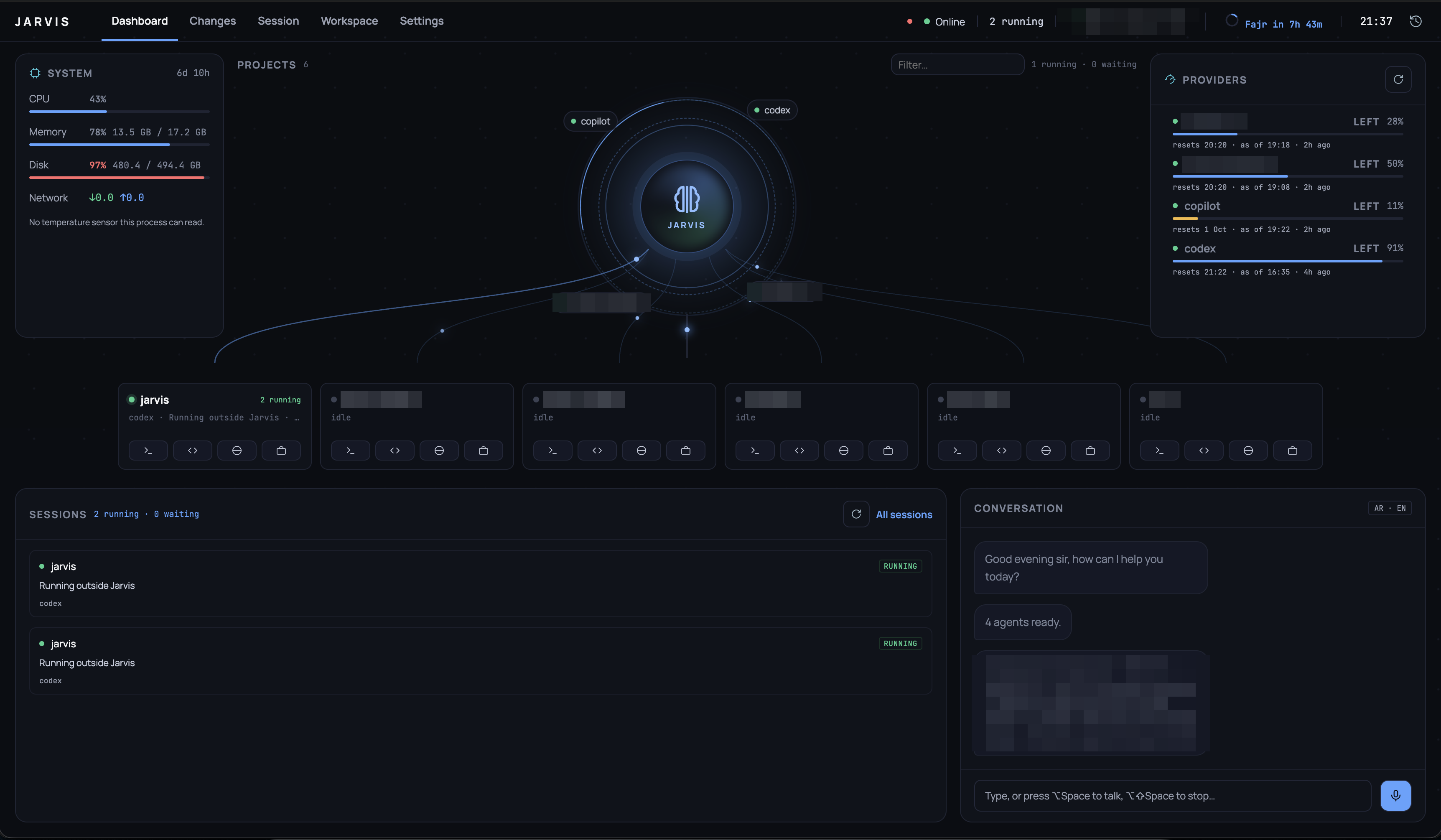
Project names, provider accounts and capacity figures are blurred — everything else is the running app.
- Sessions — each running agent, its project, its model and its state.
- Providers — each configured account, whether it is reachable, and how much capacity is left. Every figure is read for free — never from a billed query: a Claude account from the snapshot its status-line hook writes (
scripts/claude-usage-snapshot.sh, Setup §5), Codex from the rate limits it records in its own session logs, Copilot from GitHub's quota endpoint through the signed-ingh(premium requests, resetting monthly, so its reset shows as a day). Each row says "as of HH:MM", when its figure was actually taken. Under each meter, a line shows where it has been over the last day — every reading the panel has shown is kept (insessions.db, for 30 days), so the history costs no query of its own. Hover a point for its time and value. Three different unknowns are reported as three different sentences, never collapsed into one "unknown": a provider that offers no capacity reading, one with no snapshot yet, and one not yet checked are distinct facts. - System — CPU, memory and disk. Memory and disk are
total - available, which is whatdfand Activity Monitor report; a platform's ownusedcounts cached pages and reads near 100% on a healthy machine. Each reading is taken as often as it actually changes rather than every tick: CPU and network every two seconds, memory every six, disk and uptime every minute. Reading all of them every tick cost a tenth of a core permanently, most of it enumerating two dozen mounted volumes to answer a number that had not moved. - A session waiting on you — a permission menu, a
(y/n), a "Press Enter" — shows the agent's own question under its row, with one button per option it offers. A button types exactly what you would: for a menu, Down to that option and Enter. The prompt is read again at the moment you answer, and if it has changed or gone (you answered it in the terminal), nothing is typed and the row says so. The phone's session screen has the same card, and by voice, "answer yes to acme" chooses an option the same way. - Sessions carries a row of small bars in its header: sessions started on each of the last 14 days, hover for the day and count.
- Conversation and History — what has been said, and to whom.
Changes
The working tree of a session's project: which files changed, the diff for each (side by side or unified), staging, and committing.
A session that has ended still shows its repository's current state, and the view says so — it is not a snapshot of what that agent did, and pretending otherwise would be the more comfortable lie.
A row under the header carries the rest of the loop:
- The branch picker switches branch; New branch creates one from where you are and switches to it. Uncommitted changes come along, as they do with
git switch, and git itself refuses a switch they would be lost in. - Where the branch stands —
origin/main ↑2 ↓1is two commits to push and one to pull; a branch that tracks nothing yet says so. - Pull is fast-forward only. It never starts a merge or leaves conflicts in the tree; a branch that has diverged from its remote is reported, to be settled in the terminal.
- Push pushes the current branch, and a branch's first push goes to
origin(or the only remote) and starts tracking it. It is never forced. - Pull request opens the branch's open pull request, or creates one with
gh pr create --fill, pushing first if the remote is missing commits. It opens in the project's own browser tab. It needs the GitHub CLI, signed in.
A session running in a worktree of its own also gets Merge into (the branch the project's main checkout has out) and Remove worktree (once the session has ended; the branch is kept).
None of these ever waits on a password prompt: git and gh run with prompts switched off, so a remote that needs credentials it does not have says so at once instead of hanging. Credential helpers and SSH keys you already use work as they do in your terminal.
Session
One agent's real terminal, under a pty. Every byte the agent writes goes to xterm.js untouched and every keystroke goes back untouched, which is what makes slash commands, permission prompts and plan mode work at all.
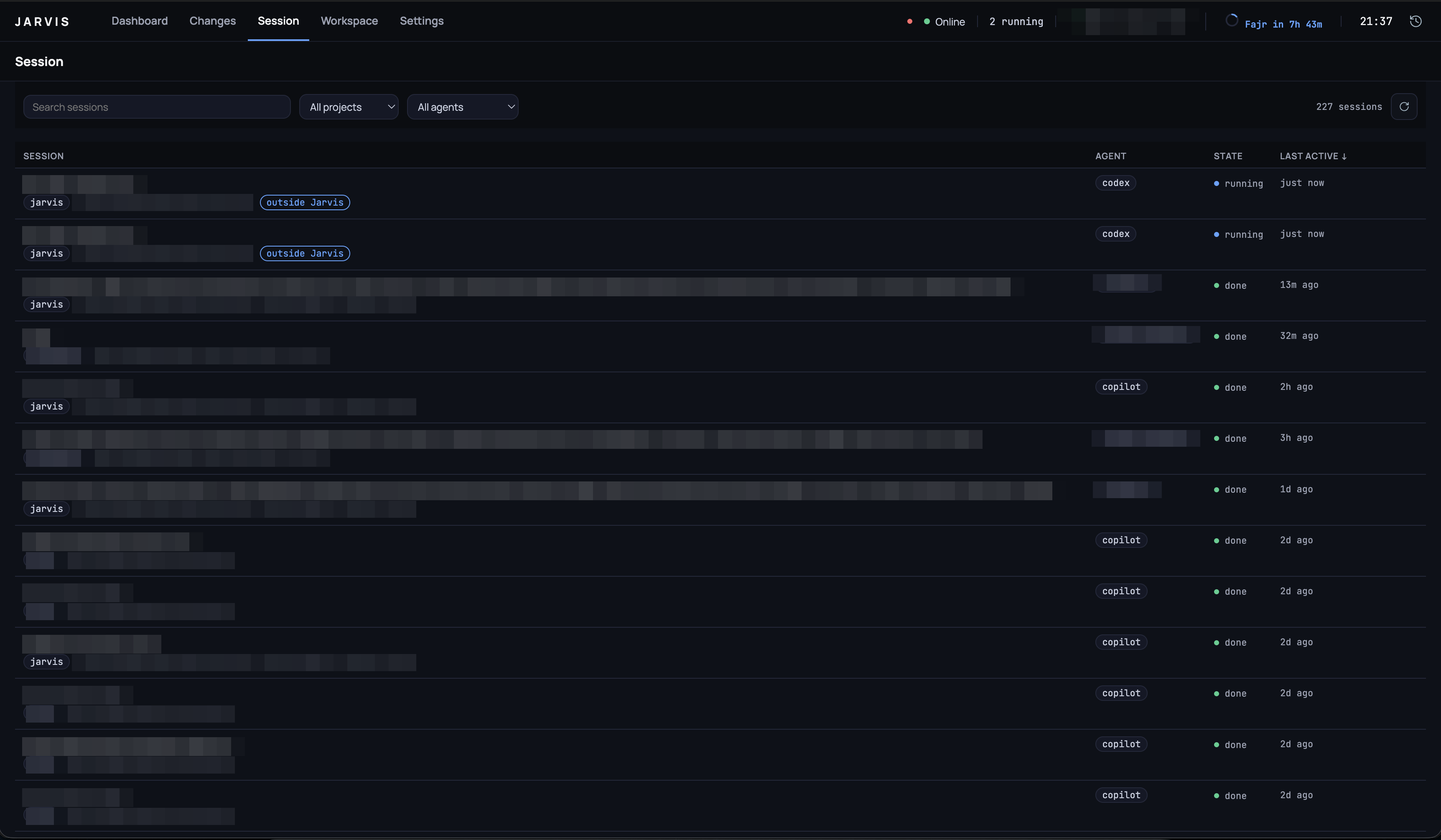
The table every session lands in, searchable and filterable by project and agent. Prompts, project names and agent accounts are blurred; the states and timestamps are the running app.
While this route is open, ⌥Space talks to this session rather than to the brain. The badge in the corner says so, because it is the one thing about voice that the terminal itself cannot show.
Workspace
A browser with tabs, per project — and the tabs are not only web pages. See Workspace tabs.
Settings
Every key of jarvis.yaml, edited in place: agents, routing, projects, databases, editor roots, the brain, voice and Whisper. One Save for the whole file, one validation pass, and a Restart Jarvis button afterwards — nothing is applied live, because a save can change which agent answers and killing a running session to apply it would be the wrong kind of helpful.
A per-agent Test button runs the health probe against the draft command before it is ever saved.
Updates, under General, shows the version you are running, when Jarvis last asked GitHub for a newer one, and — when there is one — its notes and an Install update button. Updates covers what it checks, when, and what installing does.